Subscription Tracker by WiseYears Apps
$8.99
Browser app to list subscriptions, renewals, free trials and a cancel checklist. Works offline. Works in the browser on any device. No account.
Share
See how it works
The screenshots below are from the app, in the order you work through them.
Step 1
Open the app in your web browser on your phone, tablet, or computer.
What's inside
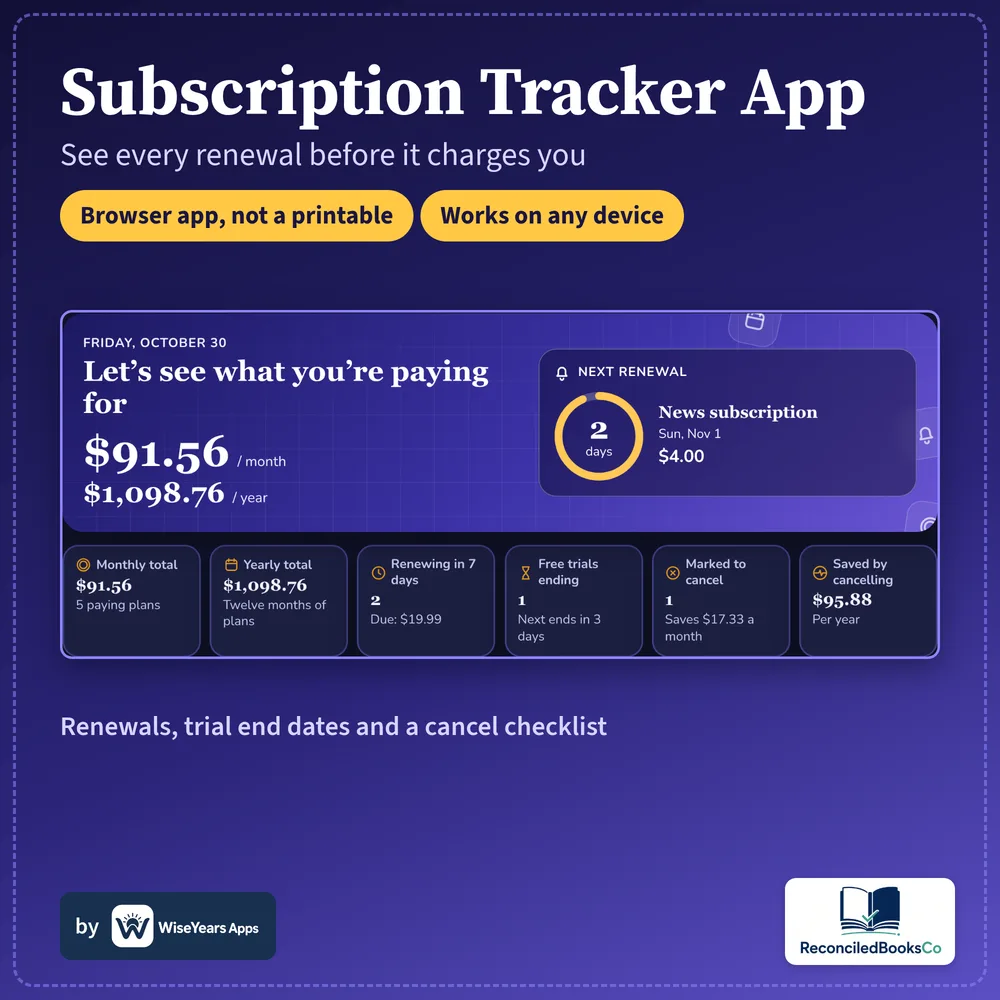
- A home screen with monthly and yearly totals, and the next renewal in days
- Needs-your-attention for cancel-by dates, trials about to end, and price increases
- Next 30 days, a renewal calendar, and totals by category
- A cancel checklist, and a Still using? mark on each plan
- Status: Active, Free trial, Cancel planned, or Cancelled
- Backup and Restore, CSV upload and export, plus Print
- Works offline. Works in the browser on any device. No account.
- This is an app, not a spreadsheet file.
Who it's for
- Households who want one list of recurring charges
- Anyone watching free trials and cancel-by dates
- Anyone who wants a browser app that works offline, with no account
Details
Recurring charges are easy to lose when they sit in different emails and bank descriptions. This browser app keeps subscriptions in one list, rolls renewal dates forward, and flags free trials, cancel-by dates and price increases.
Open it in your browser. Add each plan, see the next 30 days, and use the cancel checklist for the ones you plan to drop. Records stay on this device. After you buy, you get a link and a PDF guide with the unlock code. Works in the browser on any device.
This is an app, not a spreadsheet file. There is no account and no monthly fee. It does not cancel services or connect to a bank or card.
Before you buy
Organizational tool, not tax, legal, or financial advice. It does not cancel services, send reminders, or connect to a bank or card.
Runs in the browser. This is an app, not a spreadsheet. Checkout and delivery open in a new tab.
Checkout and delivery open in a new tab. One purchase is for your own household.