Payroll Log Template: Simple Small Business Payroll Spreadsheet
$9.99
Payroll gets risky when the only record is the bank description that just says payroll. A simple log will not file your taxes. It will tell you what you paid, when, and to whom.
Share
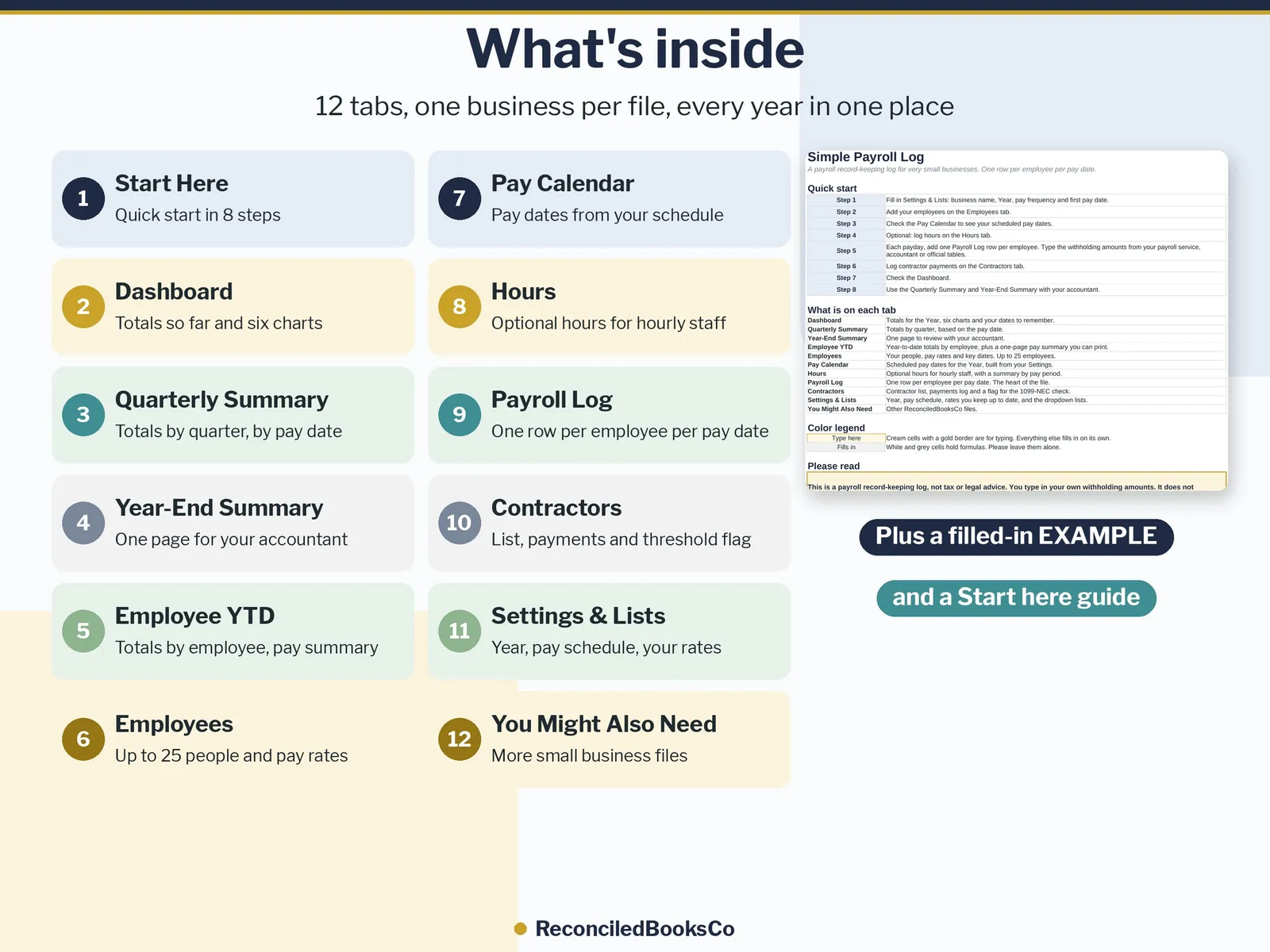
What's inside
- A log for pay dates, people, and amounts.
- A layout you can hand to a CPA without reconstructing the year from bank text.
- A filled example and a Start Here tab.
Who it's for
- Shops recording a few pay events
- Owners who already have a payroll method and need a written record beside it
- Bookkeepers pairing this log with the Small Business Bookkeeping Bundle
Details
Payroll records spread across pay stubs, bank statements and a notebook, and no quick way to see year-to-date or quarterly totals?
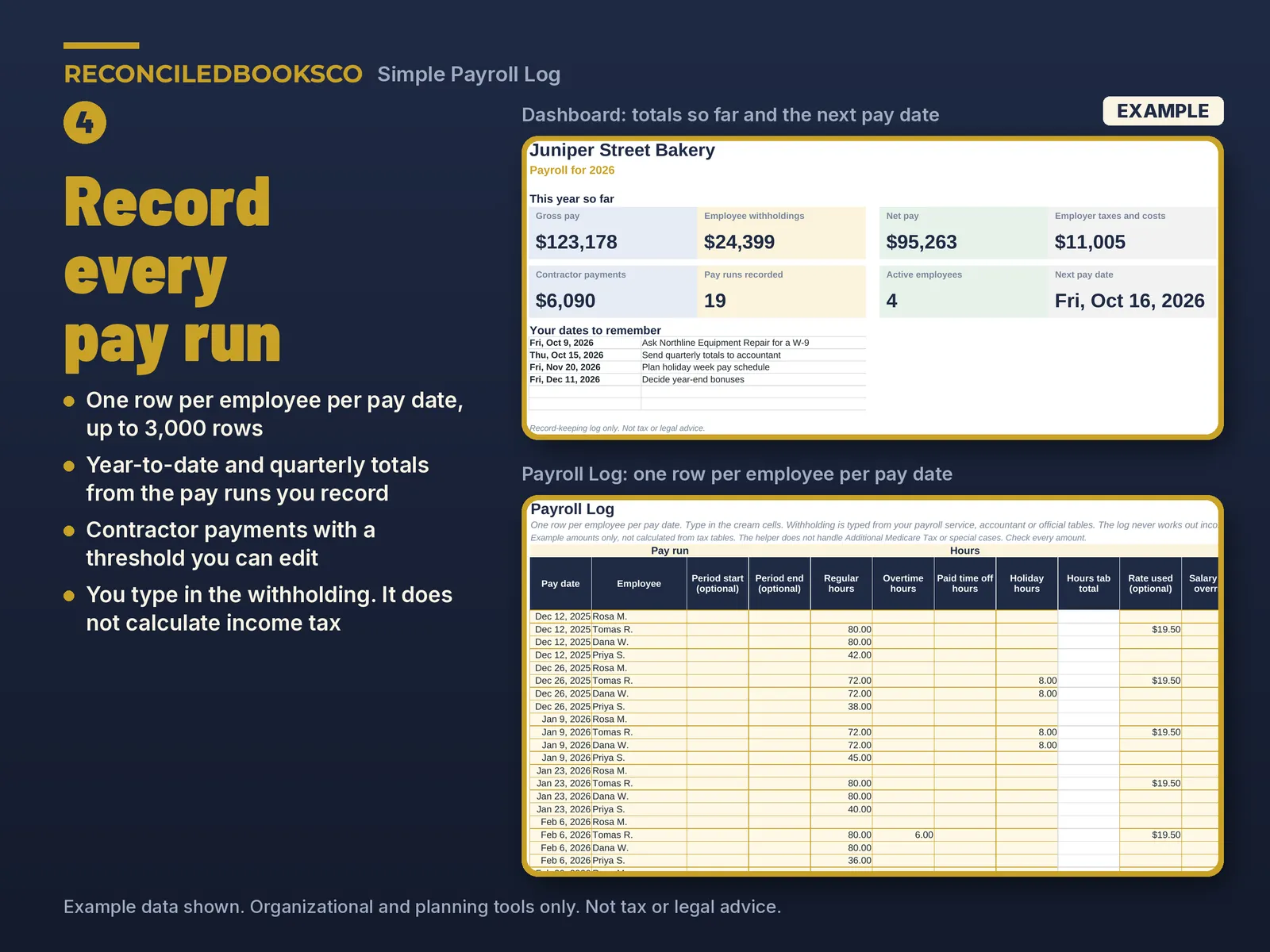
Simple Payroll Log is a payroll log spreadsheet for very small businesses. Record each pay run once, one row per employee per pay date, and the year-to-date, quarterly and year-end totals add up from the pay runs you actually recorded. You always know what you paid, to whom and when, and you have clean totals ready for your accountant or payroll provider.
Why it's different • One row per pay run: year-to-date and quarterly totals are added up from the pay runs you record, not projected from a single pay period, so they stay right when hours or pay change. • Contractor tracking in the same file: a contractor list, a payments log and a flag when a contractor's total for the year passes a threshold you can edit (preset to $2,000; check the current rules each year). • A pay statement view: print a one-page pay summary for any employee and pay date, showing this pay run and year to date. • Works in Excel and in Google Sheets with the same.xlsx file. • Every year in one file: change one Year cell and every summary follows. Your logs keep all years. • Clear about what it does: you type in the withholding amounts. An optional helper can fill in Social Security and Medicare from the rates you keep up to date, and a typed amount always wins.
What's included • Simple_Payroll_Log.xlsx: the blank workbook for your business • Simple_Payroll_Log_EXAMPLE.xlsx: the same workbook filled in for a made-up bakery • START_HERE.pdf: how to download, unzip and open the file in Excel or Google Sheets, step by step
The 12 tabs • Start Here: quick start in 8 steps, what each tab does and tips • Dashboard: gross pay, employee withholdings, net pay, employer taxes and costs, contractor payments, pay runs recorded, active employees, next pay date, your dates to remember and 6 charts • Quarterly Summary: Q1 to Q4 and the year, by pay date: wages, tips, withholding, Social Security and Medicare wages and amounts (employee and employer), employer costs and contractor payments, plus gross pay by employee by quarter • Year-End Summary: one page with each employee's and each contractor's totals for the year, to review with your accountant or payroll provider • Employee YTD: year-to-date totals by employee, plus a one-page pay summary you can print • Employees: up to 25 employees with pay type, rate, hire and end dates, status and the last 4 digits of the Social Security number only • Pay Calendar: your pay dates for the year, built from your pay schedule (weekly, every 2 weeks, twice a month or monthly) • Hours: optional regular, overtime, paid time off and holiday hours for hourly staff • Payroll Log: up to 3,000 rows with hours, pay, deductions, withholding, net pay and employer costs, plus a Check this row column that points out a missing date, a possible duplicate or net pay below $0 • Contractors: up to 25 contractors and 1,000 payments, W-9 on file, and card and payment app totals shown apart from check, bank transfer and cash • Settings & Lists: business name, Year, pay schedule, overtime multiplier, the rates you keep up to date and the contractor threshold • You Might Also Need: other files from our shop
How it works 1. Look through the EXAMPLE file for a few minutes. 2. In the blank file, fill in Settings & Lists: business name, Year, pay frequency and first pay date. Type this year's rates from the official source. 3. Add your employees and contractors. 4. Each payday, add one Payroll Log row per employee and type the withholding amounts from your payroll service, accountant or official tables. 5. Check the Dashboard, and review the Quarterly Summary and Year-End Summary with your accountant or payroll provider. Cream cells with a gold border are the ones you type in. Everything else fills in on its own. Quarter and year come from the pay date.
Works with excel & google sheets • Works in Excel 2016 or newer and in Google Sheets, which runs in your web browser. A computer is easiest for setup. • Google Sheets: open Google Sheets and use File > Import > Upload to open the.xlsx. START_HERE.pdf walks you through it. • No macros. In Excel the formula cells are protected with no password, so they are not typed over by accident. Google Sheets does not keep the protection, so type only in the cream cells there.
See it filled in first The EXAMPLE file shows a made-up bakery's full payroll year, so you can see every tab, total and chart working before you enter your own pay runs.
Instant download · digital files only This is a digital download. Nothing will be shipped. Your download link appears right after checkout and is also in your email receipt. Because these are digital files, all sales are final. If a file won't open, contact us and we'll fix it or send it again. One purchase covers one business; please don't resell or share the files.
Disclaimer This is a payroll record-keeping log, not tax or legal advice. You type in your own withholding amounts; it does not calculate federal, state or local income tax. Payroll rules differ by state and change every year. Check current federal and state rules, or ask a tax professional. The business, people and numbers in the EXAMPLE file are made up.
Built by ReconciledBooksCo, a small shop run by an experienced accountant.
Before you buy
This is a log, not payroll software. It does not calculate withholdings, file payroll taxes, or print tax forms. Confirm payroll treatment with your CPA.
Excel and Google Sheets. No macros. Paid spreadsheet products include a blank file and a filled example, plus a Start Here tab in plain English.
Licensed for one organization per purchase.